

SDKsWorktual Chatbot STT & TTS SDK
Worktual Chatbot STT & TTS SDK
Overview
Features
Choose Your Package
Get Started & FAQs
Give your customers a chatbot they can talk to and listen to.
Make customer conversations easier with Worktual Chatbot STT & TTS SDK. Let customers speak to your chatbot, turn their words into text and hear the chatbot's replies in a natural voice. Give customers a simple way to type, speak and listen while getting the help they need.
Converts customer speech into text
Reads chatbot replies aloud
Supports voice and text conversations
Recognizes speech as customers speak
Offers different language options
Includes a ready-made chatbot screen
Who is this for?
Businesses that want customers to speak with their chatbots instead of only typing.
Companies that want to offer voice conversations through their websites, mobile apps or customer portals.
Businesses that want to provide customers with an easy-to-use chatbot with voice and text features.
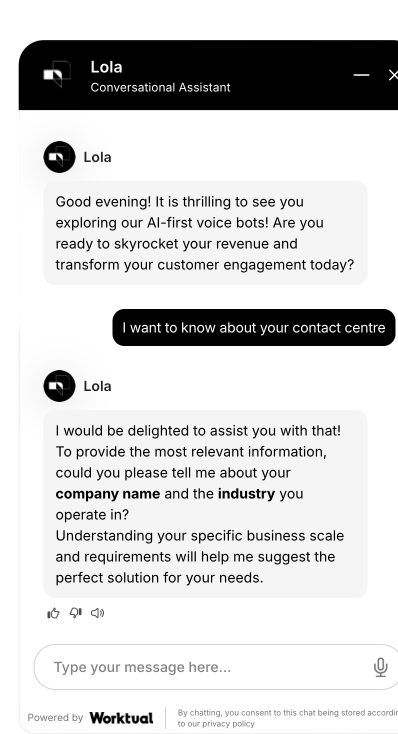
Worktual Chatbot STT & TTS SDK makes chatbot conversations easier by bringing speech and text together. Customers can speak their questions, and the chatbot converts their words into text to understand what they need. The chatbot can then reply with written messages and spoken audio. With a ready-made chat screen, businesses can offer customers a convenient way to type, speak and listen without building the chatbot interface from scratch.
Chatbot SDK + Chat Window
(with UI)
(with UI)
How It Works
From customer voice to spoken chatbot replies
01
Add the chatbot to your application.
Connect Worktual Chatbot STT & TTS SDK to your website, mobile app or software using the provided guide.
02
Customers speak or type.
Let customers ask questions by typing a message or speaking through their device.
03
Turn speech into text.
When customers speak, Worktual converts their words into written messages.
04
Prepare the chatbot reply.
Your chatbot understands the customer's question and prepares a suitable answer.
05
Turn the reply into speech.
Worktual converts the chatbot's written answer into spoken audio.
06
Deliver the answer.
Customers can read the reply on screen or listen to it through the chatbot.
The flow
Customer
Speaks or Types
Worktual Converts Speech into Text
Chatbot Prepares an Answer
Worktual Converts Text into Speech
Customer Reads or Listens
Worktual converts customer speech into text and chatbot replies into spoken audio, helping your chatbot offer a more convenient way to communicate.
Security & Trust
Keep your customer conversations and business information protected
Keep access details private.
Your main access key stays on your own servers and is not placed in the public-facing part of your website or app.
Secure audio transfer.
Send customer audio through secure connections when converting speech to text or creating spoken replies.
Controlled access.
Decide which applications and users are allowed to access your chatbot and voice services.
Protect customer conversations.
Keep customer messages, written conversations and audio information protected through suitable access controls.
Your information, your control.
Decide how chatbot conversations, recognised text and generated audio are stored and used in your business.
Fits your business setup.
Connect the chatbot to your existing application while following your organization's security requirements.
Ready to give your chatbot a voice with Worktual Chatbot STT & TTS SDK?


